.webp)
10.1.26
When AI Has to Slow Down | Carola Hahn-Auer and Ian Zhang
Read
Life Science
.svg)
.svg)
.png)
Expanding your Shopify store into new markets is exciting. But the moment you start selling across languages, one question quickly becomes more complex than it first appears:
How do you translate a Shopify store without slowing down your e-commerce operation?
For a small store with a handful of products, translating content may be relatively straightforward. But as your catalog grows, new products launch, descriptions change and more markets are added, translation becomes an ongoing business process.
The challenge is no longer simply translating a few pages. It is making sure customers in every market can discover your products, understand them and move confidently through the buying journey, while your teams continue to publish and update content at speed.
The good news is that Shopify offers several ways to manage multilingual content, from native translation tools and CSV workflows to compatible third-party applications.
For businesses looking for a direct path to professional translation, the Powerling Connector is also available through the Shopify App Store, allowing product translation requests to be created and managed from the Shopify environment.
Here is how to approach Shopify translation in a way that works today and can continue to work as your international business grows.
When businesses first think about translating an online store, the product catalog usually comes to mind.
And of course, product titles and descriptions matter. But they are only part of the customer journey.
A shopper may arrive on a category page, use navigation filters, read delivery information, compare several products, check your returns policy and look for reassurance before buying. If parts of that journey remain untranslated—or use awkward, inconsistent language, the experience can quickly lose credibility.
A multilingual Shopify experience can involve product content, collections, menus, promotional messaging, customer information, email notifications, FAQs, policies and SEO content.
That is why the first step in any international e-commerce project is not to translate everything immediately. It is to understand the customer journey and decide which content has the greatest impact on discovery, trust and conversion.
For most retailers, that means starting with the most commercially important areas of the store: key navigation, high-traffic collections, best-selling products, delivery and returns information, and the content customers need to complete a purchase with confidence.
There is no single translation method that suits every Shopify store.
A growing direct-to-consumer brand entering one new market has different needs from a retailer managing thousands of SKUs in ten languages. The right approach depends on your content volume, update frequency, quality requirements and internal resources.
Shopify currently supports several translation routes, including its Translate & Adapt app, CSV import and export, and compatible third-party translation apps.
For businesses taking their first steps into multilingual e-commerce, Shopify's own Translate & Adapt app can be a useful starting point.
The app supports manual translation and AI-generated automatic translation for supported content. Shopify recommends reviewing automatic translations for accuracy before publishing them.
This approach may suit stores with relatively straightforward content needs and teams that are comfortable managing translation directly inside Shopify.
However, as a business grows, the challenge often shifts. The question becomes less about how to translate individual strings and more about how to manage terminology, professional review, multiple languages and frequent updates consistently.
Shopify also supports exporting and importing translation content through CSV files. This can provide flexibility when translations are managed outside Shopify.
For occasional translation projects, a file-based workflow can work well.
But consider what happens when hundreds of products change every month. Files need to be exported, transferred, translated, checked and imported again. Someone must track what changed, which version is current and whether every translation made it back into the right place.
As content volume increases, the operational workload can grow just as quickly as the translation workload itself.
For businesses that need professional human translation and a more structured way to manage product localization, a connected workflow can reduce the amount of manual coordination required.
The Powerling Connector, available on the Shopify App Store, lets users select products and target languages and create translation requests. The connector provides product translations, automatically applies translations and uses human translators. (it also supports machine Translated post edited and Machine Translation workflows)
The result is a simpler experience for teams that want to keep working from within their Shopify environment while connecting product content to professional translation expertise.
Before sending the first product for translation, a little preparation can make a significant difference.
More languages do not automatically mean more international growth.
Look at where demand already exists. Review international traffic, sales enquiries, customer data and commercial priorities. Consider whether your logistics, customer service and marketing operations are ready to support the target market.
Then think beyond language alone.
French for France and French for Canada share a language, but customers may expect different terminology, messaging and market-specific information. The same principle applies to English, Spanish, Portuguese and many other languages.
Good localization starts by defining the audience clearly.
Not every piece of content has the same commercial value.
A sensible first phase may focus on a priority collection or a group of best-selling products. This gives the business an opportunity to validate the workflow and the market before expanding the localization program.
It can also be useful to separate content by type.
A technical specification requires precision. A campaign headline may need creative adaptation. A legal document demands a different review process again.
Treating every word in exactly the same way is rarely the most effective approach.
Product catalogs contain repeated terminology: materials, product features, categories, technologies, collection names and brand expressions.
Without clear terminology, inconsistencies multiply quickly.
A single product feature may be translated one way on a product page, another way in navigation and a third way in a campaign. Each version might be linguistically possible, but the overall customer experience feels less coherent.
Creating approved terminology and tone-of-voice guidelines before scaling translation helps translators, reviewers and internal teams work toward the same brand experience.
For Shopify merchants using Powerling's professional translation workflow, the connector is designed around a simple process: configure languages, select the products to translate, choose target languages and track the resulting request. The app is listed on the Shopify App Store and works with Shopify Admin.
The connector's Settings area gives users a clear view of the languages available in their workflow and the corresponding regional variants.
This distinction matters for international businesses. Translating into a language is one part of localization; making sure the language is appropriate for the target audience is another.
A clearly defined language and regional setup helps create a stronger foundation for consistent product localization.

Once the language configuration is ready, translation requests can be created directly from the connector.
Products are selected from the store catalog, and the target language or languages are chosen for the request.
This makes it possible to organize localization around real business priorities.
A retailer might send a new collection for translation before an international launch. Another business might start with its highest-performing products. A seasonal brand may work collection by collection throughout the year.
The important point is that translation can follow the rhythm of the e-commerce operation rather than being treated as one enormous, disconnected project.
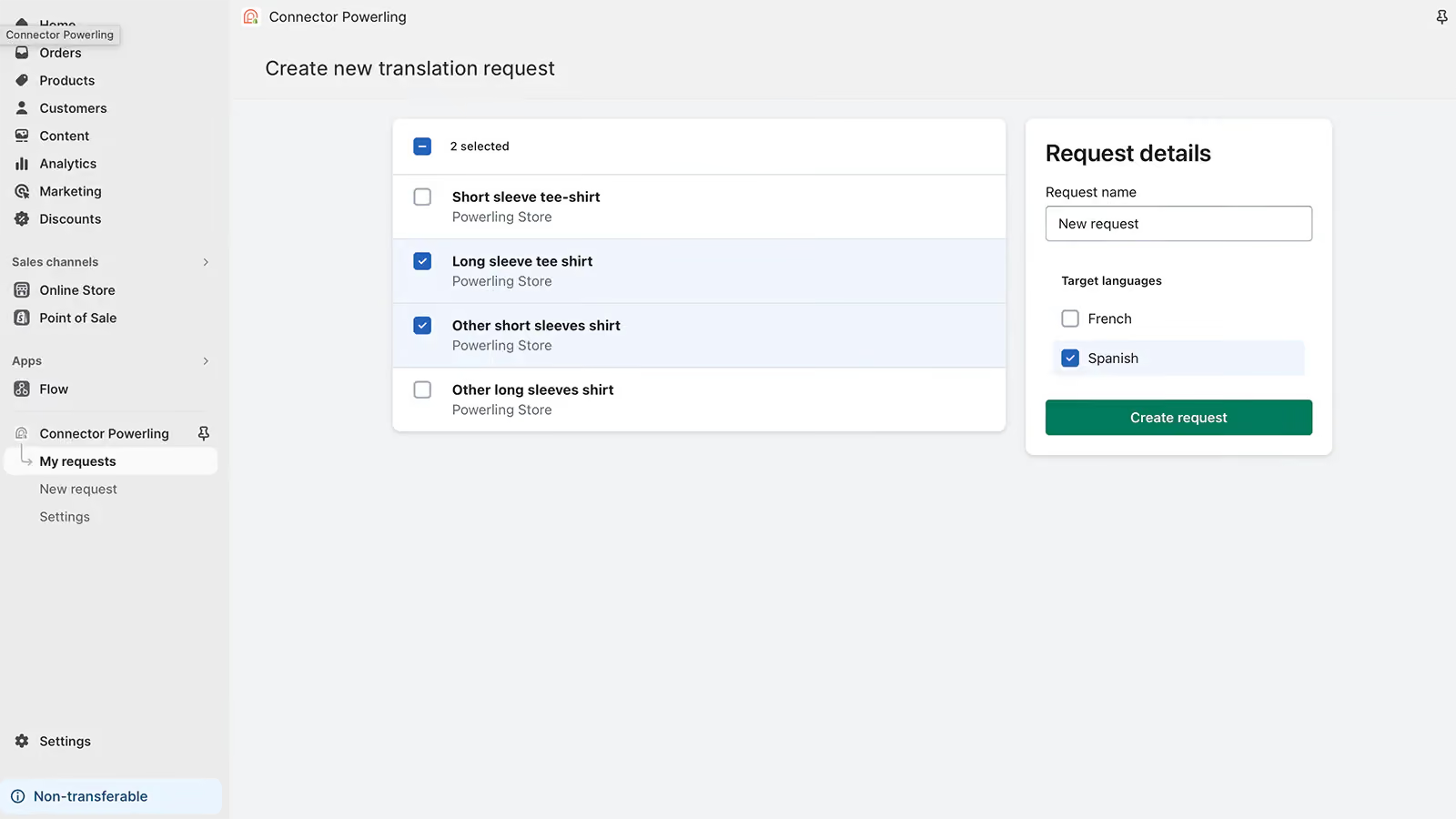
Once a translation request has been created, the connector's request view displays key information including the request name, source language, target language and current status.
For e-commerce teams, visibility matters.
When translation activity is managed through a chain of emails, spreadsheets and folders, answering simple questions can take time. Has this collection been sent? Which language is being worked on? Is the translation still pending?
A centralized request view makes the workflow easier to follow.
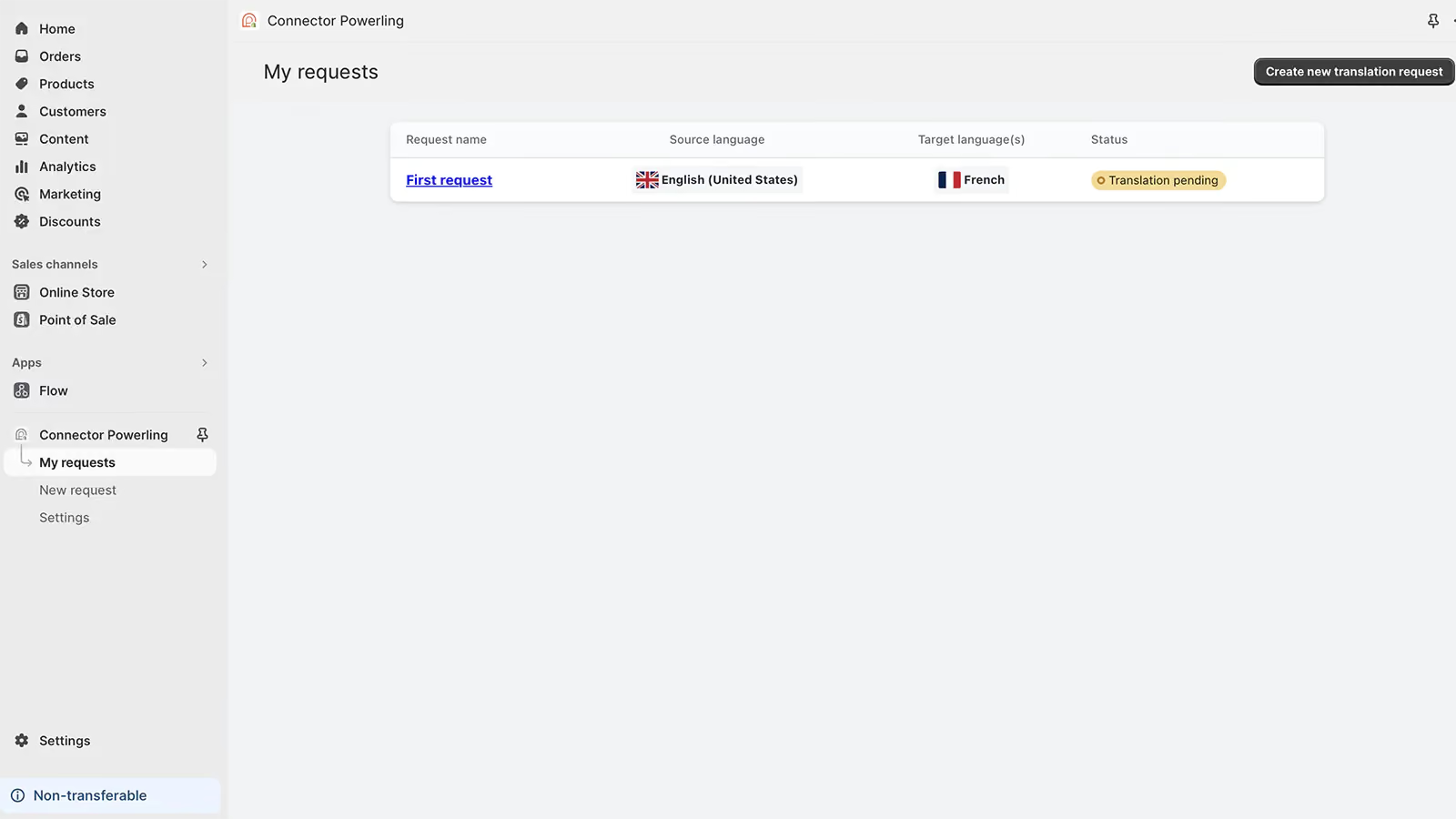
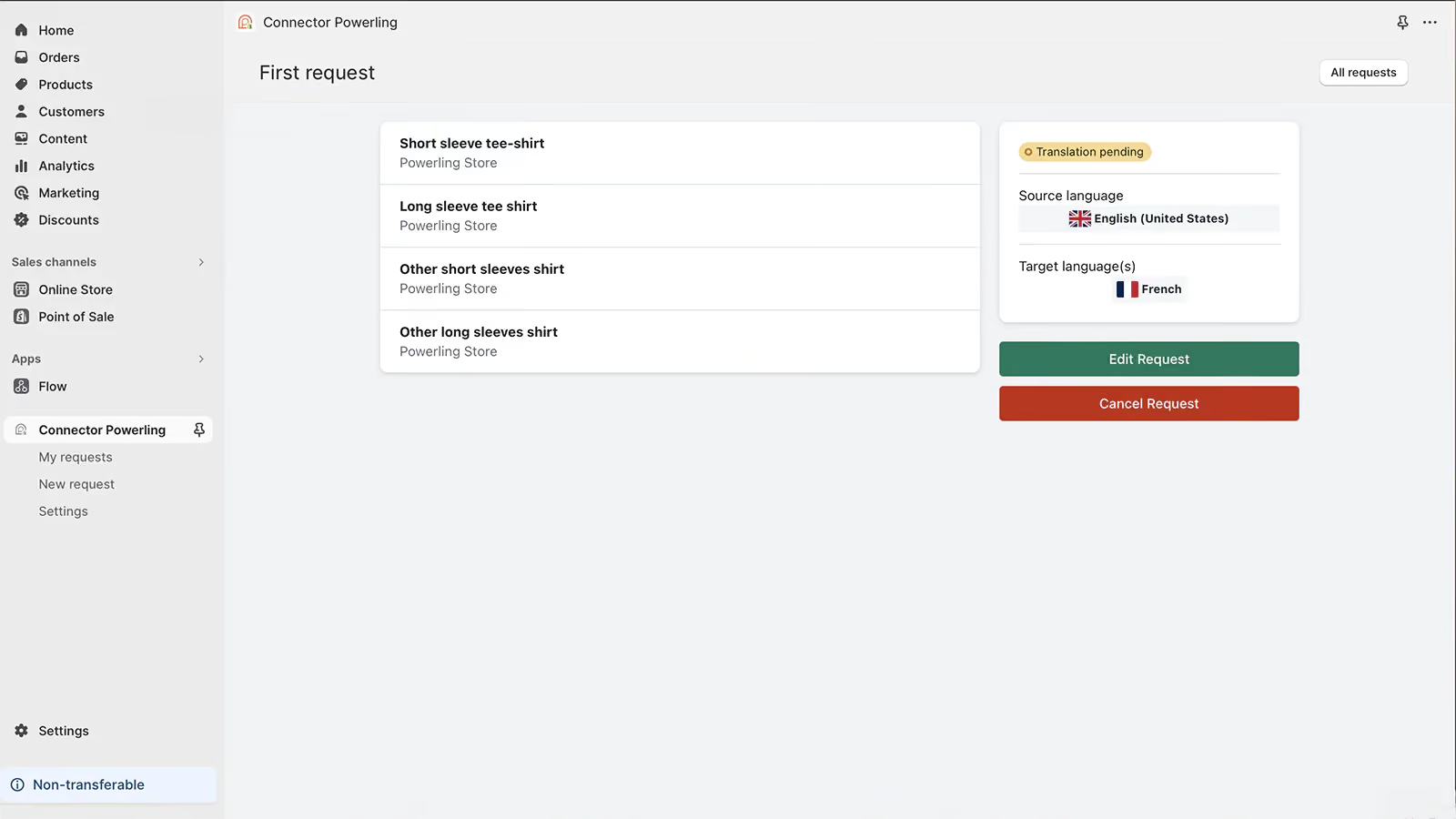
Each request can also be opened to see the products included, together with the source language, target language and current translation status.
For teams managing multiple launches or language combinations, connecting each group of products with a clearly identified translation request can make day-to-day localization management more straightforward.
The connector therefore creates a simple operational flow:
Select your products. Choose your target languages. Create the request. Track its progress. Receive the translated product content back in your store.
The Shopify App Store listing describes the connector as providing product translations and automatically applying those translations.
For a more complete view of your localization activity, MyPowerling gives you a central customer portal for managing translation projects beyond the Shopify interface.
From MyPowerling, you can track translation requests, review and approve quotes, manage project files and download completed deliverables. This makes it easier for e-commerce, marketing and localization teams to keep an overview of ongoing work, project status and associated costs in one place.
MyPowerling can also support more complex or customized workflows when a translation project requires additional steps, approvals or file management outside Shopify. In practice, this means Shopify can remain the operational entry point for product translation requests, while MyPowerling gives teams the broader project visibility and control they need as localization activity grows.
A translated Shopify store should not only be understandable. It should also be discoverable.
One of the most common mistakes in international e-commerce is translating keywords word for word.
Customers in another market may search for the same product using completely different terminology. A literal translation can be perfectly correct linguistically and still miss the phrase people actually type into a search engine.
That is why multilingual SEO should involve local keyword research and search-intent analysis, not simply keyword translation.
Shopify creates distinct URLs for published language versions and automatically adds hreflang tags based on language and market configuration. Shopify also includes published languages in sitemaps, helping search engines discover the different versions of the store.
But the technical setup is only part of the picture.
The content itself must reflect how people search locally. That means reviewing product titles, collection names, headings, metadata and supporting content for each market.
A French customer and a German customer may be looking for the same product, but the route they take to find it may be different. Your localization strategy should account for that.
A translation can be correct in a document and still fail on the page.
Words expand and contract between languages. Button labels can become too long. Product titles can wrap awkwardly on mobile. Some content may remain in the source language. A translated description may sound unnatural next to an untranslated banner or image.
That is why quality assurance should happen in context.
Test the localized store as a customer would experience it. Browse collections. Open product pages. Check mobile layouts. Follow navigation. Review delivery and returns information. Move through the purchasing journey.
The goal is not simply to verify that the text has been translated.
The goal is to make sure the experience still feels natural, credible and easy to use.
The biggest translation challenge often appears after the multilingual store goes live.
A new product is added. A description changes. A collection is renamed. A seasonal campaign launches. An SEO team rewrites a category page.
Suddenly, the translated store begins to fall behind the source store.
This is where a repeatable workflow becomes essential.
Ask a few simple questions:
- How will the team know which products have changed?
- Who decides which updates need translation?
- How are translations reviewed?
- How is progress tracked?
- How does approved content return to Shopify?
For a small catalog, these questions may be answered with a simple internal process. For larger international operations, connecting Shopify to the localization workflow can reduce manual handling and make translation activity easier to manage.
Powerling's wider workflow-integration approach focuses on connecting content platforms and localization systems, with Shopify included among its current connectors. Powerling positions these integrations as a way to reduce manual file transfers, improve traceability and create more controlled global content workflows.
The best approach depends on the store you have today, and the store you expect to operate tomorrow.
For a small catalog and one additional language, Shopify's native translation tools or a simple manual process may be enough.
For a larger product catalog, several target languages or a constant flow of new and updated content, the challenge is different. You need a process that combines quality with speed and gives teams visibility over what is happening.
The strongest Shopify localization strategies usually bring several elements together: clear market priorities, appropriate translation methods for different content types, consistent terminology, multilingual SEO, quality assurance and a reliable process for ongoing updates.
Because international e-commerce does not stand still.
Your catalog changes. Your markets evolve. Your customers expect relevant experiences in their own language.
The right translation workflow should make that growth easier, not create another layer of manual work.
With the Powerling Connector, Shopify merchants can select products, choose target languages and send translation requests into a professional translation workflow directly from their Shopify environment. The connector is available through the Shopify App Store.
Whether you are preparing your first international launch or managing a fast-growing multilingual catalog, the goal is the same: make high-quality localized content easier to create, manage and scale.
Bring your Shopify store closer to customers in every market with a translation workflow designed for international growth
If your organization is investing heavily in content but lacks full visibility, alignment, or scalability, it is time for a structured assessment.


.svg)


.svg)

.svg)





.svg)